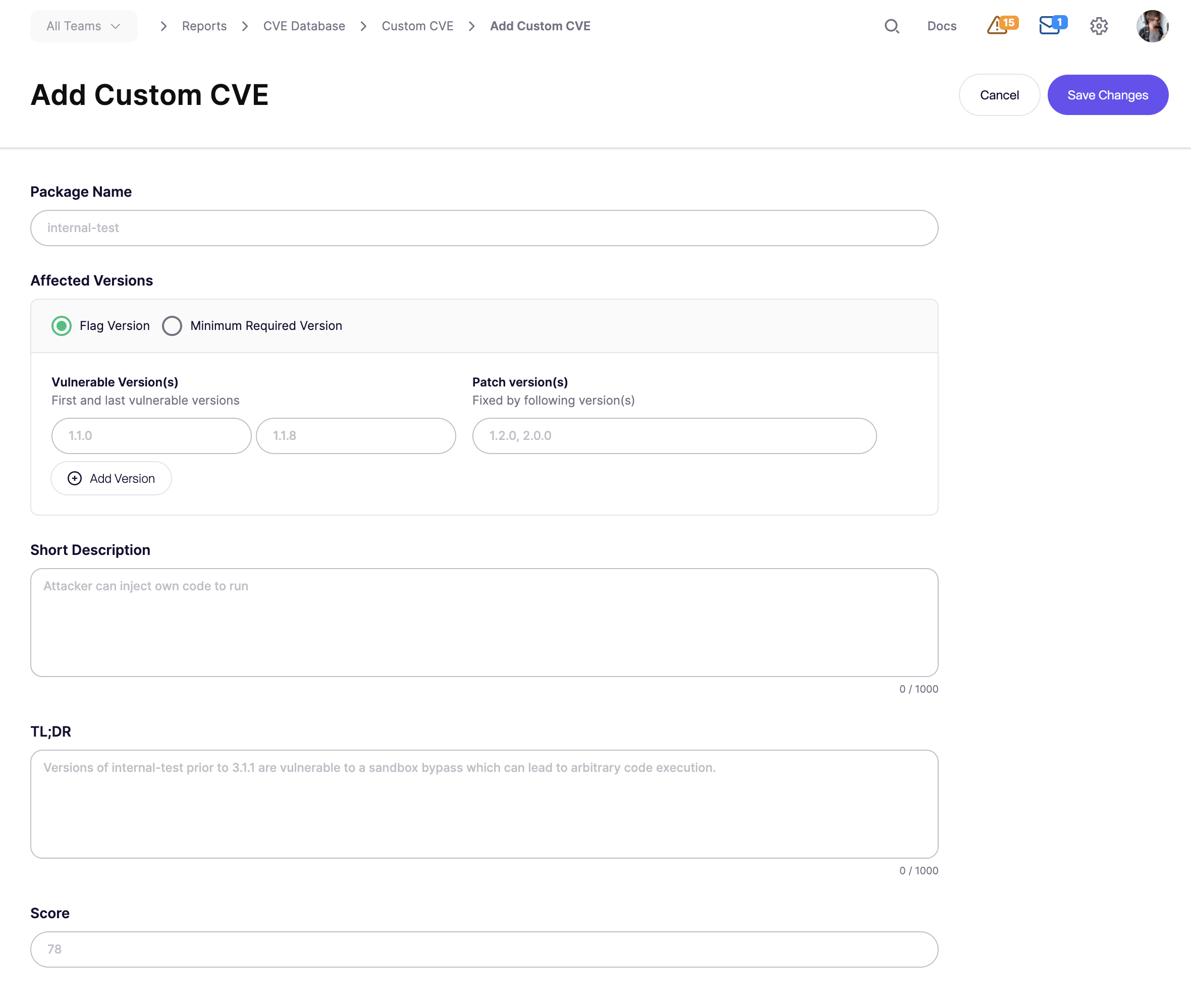
# Custom CVE Vulnerabilities
Aikido lets workspace admins define Custom CVEs for internal or private packages. When a scan finds a matching package and version, Aikido creates an open-source issue with a `CUSTOM-CVE-{id}` identifier.
{% hint style="info" %}
This feature needs to be enabled on workspace level. Contact us to enable.
{% endhint %}
#### Use Cases
* Internal or private packages: you maintain a library that isn’t in the public CVE database but has a known security flaw.
* No public CVE exists: a vulnerability was found internally but was never assigned a CVE.
* Policy-driven blocking: you want to enforce “no versions below X” for an internal package across all repos and containers.
#### Add a Custom CVE
**Step 1.** Go to [**CVE Database**](https://app.aikido.dev/reports/cve) **Report** → **Manage Custom CVEs**
**Step 2.** Click **Add Custom CVE**.
**Step 3.** Fill in these fields:
* **Package name**
* Use the exact package name as detected in scans.
* **Affected versions**
* Use one of these matching methods:
* **Flag Version:** define the first vulnerable version, the last vulnerable version, and the patch or fix version.
* **Minimum Required Version:** flag any version below a required minimum.
* **Short description, TL;DR and Score**
* Set a priority from `1` to `100`. This sets the issue severity.
**Step 4.** Click **Save Changes**.
Aikido assigns a `CUSTOM-CVE-{id}` and starts matching it on the next scan.
Example
Package `acme-auth-lib` is vulnerable from `1.0.0` through `1.5.2`.
Version `1.6.0` contains the fix.
Create the Custom CVE like this:
* **Package name:** `acme-auth-lib`
* **Flag Version:** `1.0.0` → `1.5.2`
* **Patch version:** `1.6.0`
* **Score:** `78` which maps to High severity
Any repository using a vulnerable version gets an issue.
Upgrading to `1.6.0` closes the issue automatically on the next scan.
#### Troubleshooting
A Custom CVE issue may not appear if:
* the package name does not match exactly and is case-sensitive
* the installed version falls outside the defined range
* the package is a dev dependency and dev dependency scanning is off
* the feature is not enabled for your workspace
If the affected package is a dev dependency, enable dev dependency CVE scanning first. See [Scanning Dev Dependencies for CVEs](https://help.aikidogov.us/code-scanning/scanning-practices/scanning-dev-dependencies-for-cves).