# Export RAW SBOM of Your Containers
## Introduction
Exporting a RAW SBOM with Aikido enhances software security and transparency. This feature is particularly useful for:
* Identifying the filesystem locations of issue discoveries.
* Tracking the origin of installed components.
## Step-by-Step Guide
**Step 1:** Navigate to any **container detail** page on Aikido.
**Step 2:** Click **Actions** in the top right.\
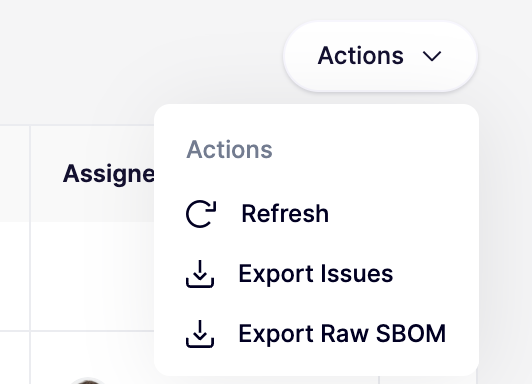
**Step 3:** Choose **Export RAW SBOM** to generate and download the SBOM for your container.
## Limitations
The RAW SBOM Export is available only for images scanned by Aikido, not for those analyzed through AWS Inspector or GCP Vulnerability Scanning.
More information on setting up your container scanning with the Aikido Scanner can be found [here](https://help.aikido.dev/container-image-scanning/cloud-provider-registries/aikido-scanner-for-aws-ecr).
### Generate and Export via API
Aikido supports generating and downloading SBOMs via the API. More information can be found on the Apidocs in [exporting a container SBOM](https://apidocs.aikido.dev/reference/exportcontainerrepolicenses) and [exporting a source code SBOM](https://apidocs.aikido.dev/reference/exportcoderepolicenses).