# SAST ルールの Custom Code Context
Custom Code Context を使うと、特定の SAST ルールに平易な言葉でガイダンスを追加できます。Aikido は [SAST AutoTriage](https://help.aikidogov.us/docs/docs-ja/aikido-agent/sast-autotriage) の実行時にそのガイダンスを使用し、真陽性と偽陽性の判定精度を高めます。コンテキストはグローバルまたはリポジトリ単位で追加できます。
これはルールが検出する内容を変更するもの**ではありません**。Aikido が検出結果をより正確に解釈できるようにするものです。
### ユースケース
ルールにコードベース固有の知識が必要な場合に Custom Code Context を使用します。例えば次のようなものです。
* 信頼できるサニタイズライブラリ
* リスクのある API を安全にラップする社内ラッパー
* データを信頼済みとしてマークするバリデーションヘルパー
* 特定のリポジトリでのみ安全なパターン
* 信頼できる入力を扱う隔離されたマシン上で実行されるスクリプト
具体例を表示
**信頼できるサニタイズライブラリ**
{% code overflow="wrap" %}
```
We often use the public library for sanitization. Every variable returned by a function from this library is considered trusted.
```
{% endcode %}
**社内バリデーションヘルパー**
{% code overflow="wrap" %}
```
For this rule, values returned by validateAndNormalizeUserInput() are considered sanitized. This helper rejects invalid characters and enforces a strict allowlist.
```
{% endcode %}
**リスクのある API の安全なラッパー**
{% code overflow="wrap" %}
```
For this rule, calls made through safeRedirect() are expected. This wrapper only allows redirects to URLs from our approved domain allowlist.
```
{% endcode %}
### コンテキストの追加方法
{% hint style="info" %}
Custom Code Context は、AutoTriage に対応した SAST ルールでのみ利用できます。
{% endhint %}
**ステップ 1.** Repositories Checks ページを開き、「[View SAST Rules](https://app.aikido.dev/repositories/sast)」を選択します。
**ステップ 2.** 該当する SAST ルールを見つけてアクションメニューを開き、**Custom Code Context** を選択します。
 **ステップ 3.** コンテキストを平易な言葉で入力します。
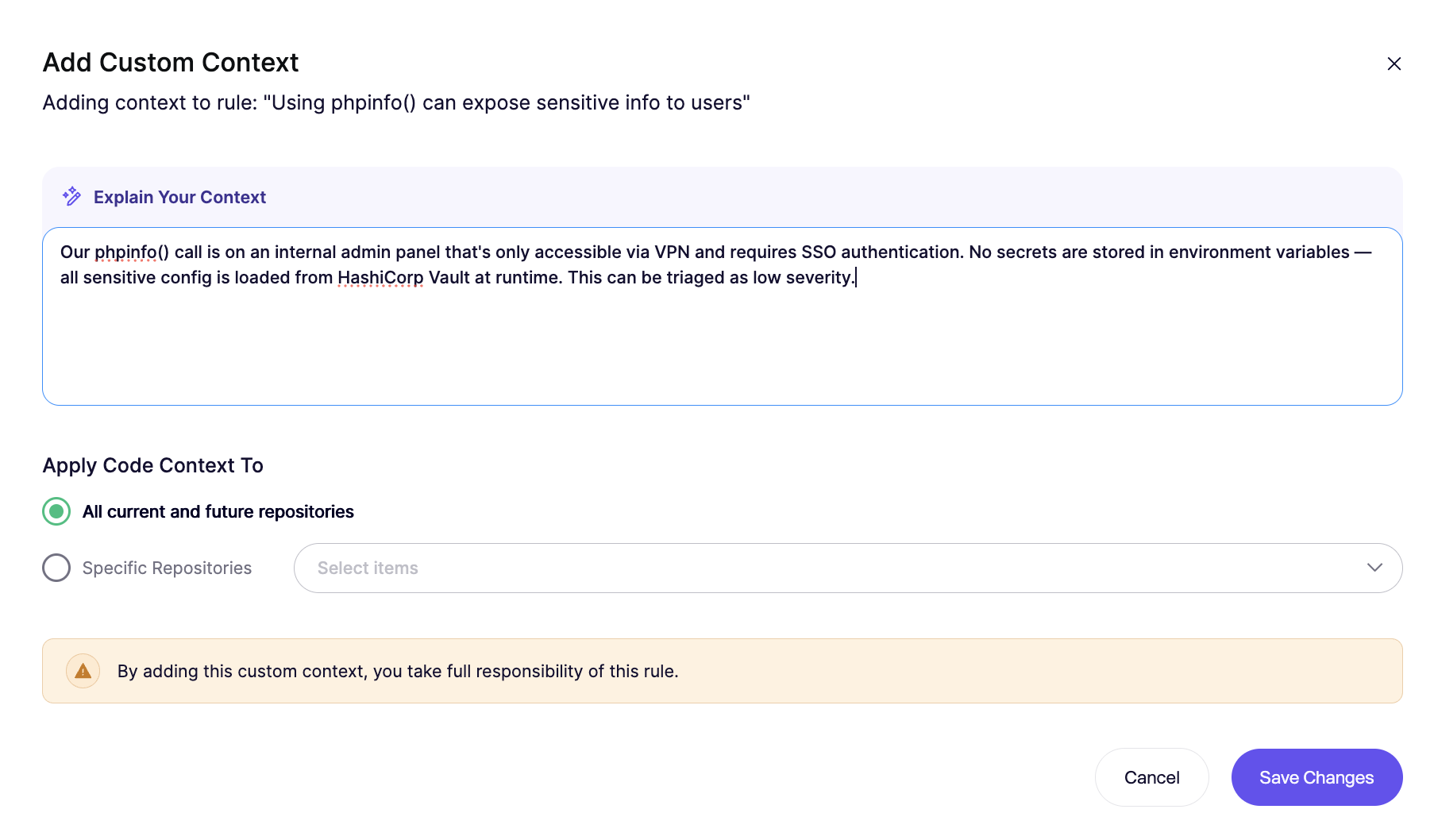 **ステップ 4.** コンテキストをグローバルに適用するか、そのリポジトリのみに適用するかを選択します。変更を保存します。
{% hint style="info" %}
新しいコンテキストを適用するには、手動での再スキャンが必要です。
{% endhint %}
### 記述のヒント
コンテキストは範囲を絞り、具体的に記述してください。
推奨:
* ライブラリ、関数、ラッパー、フォルダの正確な名前を記載する
* データが信頼済みまたはサニタイズ済みである理由を説明する
* 選択したルールに特化した内容にする
避けるべきこと:
* 「入力は通常サニタイズされている」のような広すぎる主張
* 関数名を含まない曖昧な記述
* すべてに当てはまる例外
良い例と弱い例を表示
**良い例**
{% code overflow="wrap" %}
```
For this SQL injection rule, values returned by buildSafeQuery() are trusted. That helper only creates parameterized queries and never concatenates raw user input.
```
{% endcode %}
**弱い例**
{% code overflow="wrap" %}
```
Our team is careful with SQL queries, so these findings are often false positives.
```
{% endcode %}
### Custom Code Context とカスタム SAST ルールの違い
既存のルールのトリアージを改善したい場合は、Custom Code Context を使用します。
コードベース内の新しいパターンを検出する必要がある場合は、[カスタム SAST ルール](https://help.aikidogov.us/docs/docs-ja/code-scanning/scanning-practices/add-custom-sast-iac-rules)を使用します。
要するに:
* **Custom Code Context** は解釈を精緻化します
* **カスタム SAST ルール** は検出範囲を拡張します