# Setting Roles and Permissions

## Roles and Permissions Logic <a href="#roles-and-permissions-logic" id="roles-and-permissions-logic"></a>

Aikido offers three distinct user roles (**admins**, **default** and **team-only** users) to manage access and permissions effectively. Default and team-only users can have **standard editing rights** or can be **read-only**.

| Role                | Access Level                                                 |
| ------------------- | ------------------------------------------------------------ |
| **Admins**          | Full access                                                  |
| **Default Users**   | <p>Global / All Teams</p><p>Standard rights or read-only</p> |
| **Team-Only Users** | <p>Team-specific</p><p>Standard rights or read-only</p>      |

### Default Users vs Team-Only Users <a href="#default-users-vs-team-only-users" id="default-users-vs-team-only-users"></a>

The main difference between the two is that team-only users only have access to those issues for the teams they belong to. They still are able to mostly manage issues.

| Permission                                                                           | Default Users | Team-Only Users                                       |
| ------------------------------------------------------------------------------------ | ------------- | ----------------------------------------------------- |
| <p><strong>Issue Actions</strong></p><p>Snooze, ignore, severity change, autofix</p> | ✅             | ✅                                                     |
| **Create Tasks**                                                                     | ✅             | ✅                                                     |
| **Add Repos**                                                                        | ✅             | ❌                                                     |
| **Add Container Registries**                                                         | ✅             | ❌                                                     |
| **Add Domains**                                                                      | ✅             | Connected to repos only. No standalone.               |
| **Export Issues**                                                                    | ✅             | ❌                                                     |
| **Pentest Issues**                                                                   | ✅             | ✅ if all linked repos are in their teams              |
| **AI Code Analysis Issues**                                                          | ✅             | ✅ if all linked repos are in their teams              |
| **Code Quality**                                                                     | ✅             | ❌                                                     |
| **Zen Firewall**                                                                     | ✅             | ❌                                                     |
| **Access to Settings**                                                               | All settings  | General Settings **Only**                             |
| **Access to Reports**                                                                | All Reports   | Trends Over Time, Licenses & SBOM and Malware Monitor |

### Advanced Rights for Users with Standard Rights <a href="#advanced-rights-for-users-with-standard-rights" id="advanced-rights-for-users-with-standard-rights"></a>

Aikido has an extra layer of permissions that can be enabled or disabled (both for default and team-only users). This is helpful in case you still want users to be able to execute certain actions. **Read-only rights block all possible actions.**

**Configurable for Default and Team-Only**

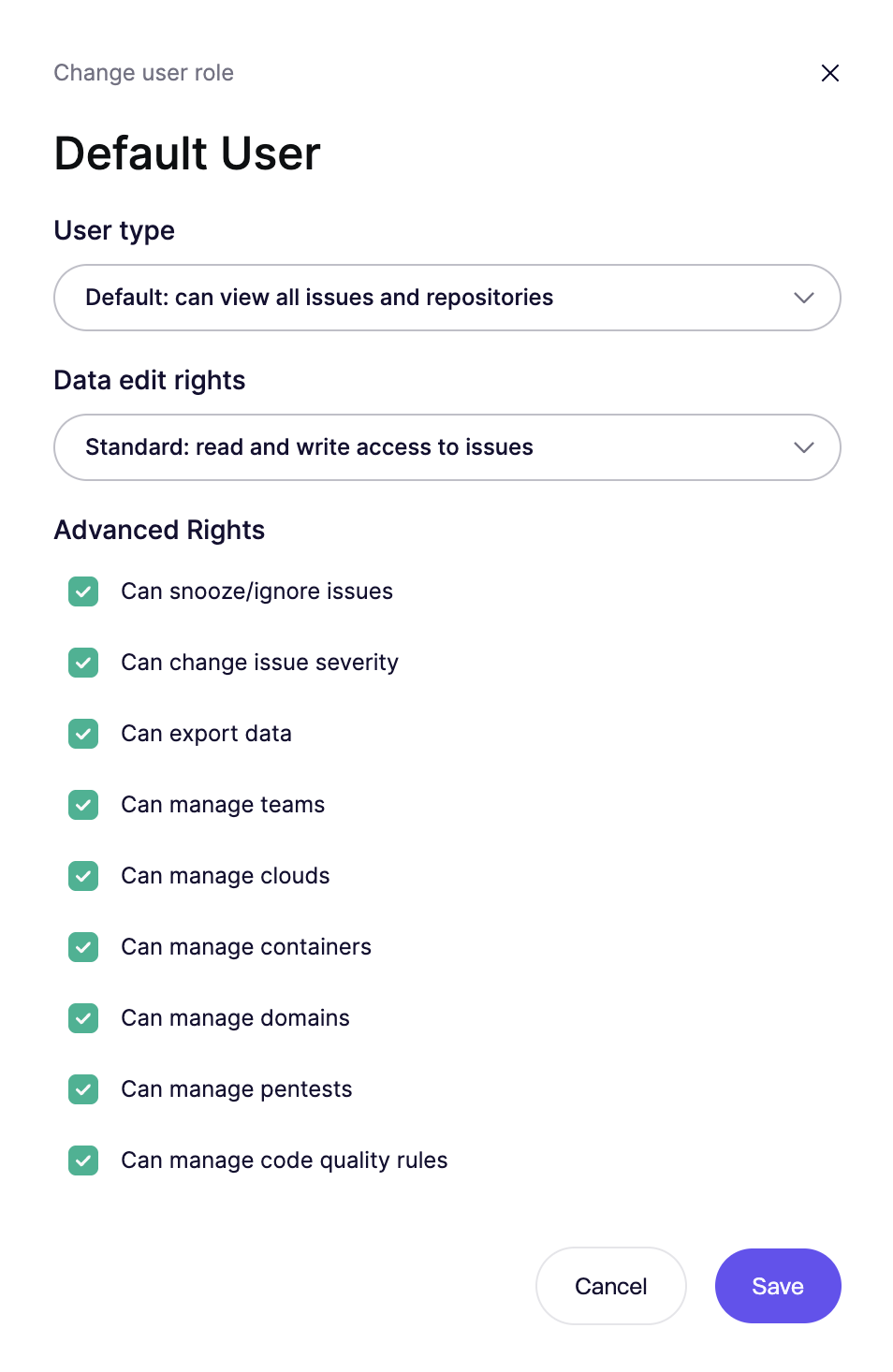
* **Can ignore issues**: Ability to permanently ignore findings. When [ignore requests are enabled](https://help.aikidogov.us/getting-started/core-functionalities/approval-inbox-for-ignored-issues#enabling-ignore-requests), users without this permission can request to ignore individual issues via the [approval inbox](https://help.aikidogov.us/getting-started/core-functionalities/approval-inbox-for-ignored-issues).
* **Can snooze issues**: Ability to temporarily snooze findings. When ignore requests are enabled, users without this permission can request to snooze individual issues via the same inbox.
* **Change Issue Severity**: Ability to modify the severity level of issues.
* **Can export data:** Ability to export csv reports of vulnerability issues.
* **Can manage repositories:** Ability to change branch, set multi-branch scanning and manage custom SAST rules.

**Limited to Default Users**

* **Manage Teams**: Ability to manage team settings and membership.
* **Manage Clouds:** Ability to add and configure clouds
* **Manage Containers:** Ability to add and configure containers
* **Manage Domains:** Ability to add and configure domains
* **Manage Pentests and AI Code Analysis:** Ability to create, run, and configure pentests.
* **Manage Code Quality:** Ability to run and configure code quality
* **Manage Device Protection:** Ability to add devies and configure rules

## How to change roles and permissions <a href="#how-to-change-roles-and-permissions" id="how-to-change-roles-and-permissions"></a>

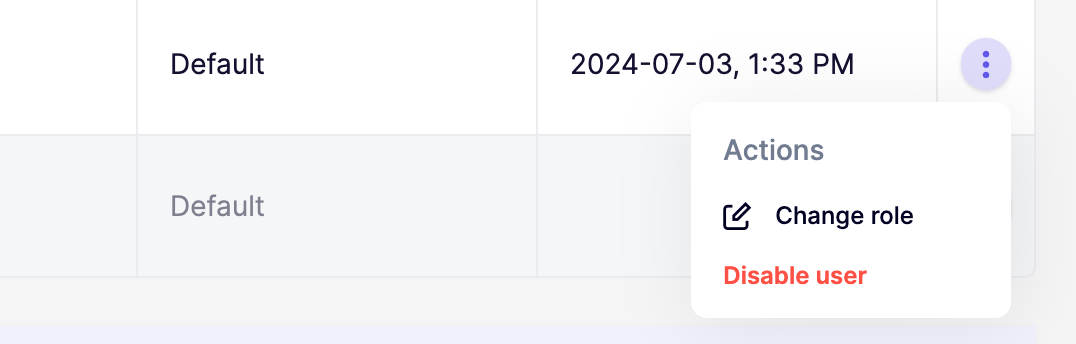
**Step 1.** Go to the user overview in your settings

**Step 2.** Click the triple dots to open up the role and permissions modal for a specific user
<div data-with-frame="true"><img src="https://help.aikidogov.us/_assets/3d6a6998c9b9/ucarecdn-3666ec2a-c91c-473f-9352-6c191c51c09b.png" alt="" width="375"></div>

**Step 3.** Set the preferred user role and permissions

<div data-full-width="false" data-with-frame="true"><figure><img src="https://help.aikidogov.us/_assets/7b4d9116f540/Screenshot-2025-11-17-at-21.47.17.png" alt="" width="375"><figcaption></figcaption></figure></div>

## FAQ

Why am I seeing the error "You cannot change the role of a more senior admin"?

* This means the admin you're trying to modify joined the Aikido workspace before you and has a higher privilege level. To change their role, contact Aikido Support via the in-app chat to request an elevation of your admin permissions.
