# Blocking or Monitoring Tor traffic with Zen Firewall
Zen Firewall by Aikido helps you identify and block users who are accessing your application through the [Tor network](https://www.torproject.org/). This feature enhances your security measures by providing visibility and control over [Tor-based traffic](https://www.torproject.org/).
> **Important**: Tor blocking operates independently of the global "[Blocking/Detection Mode](https://help.aikidogov.us/zen-firewall/zen-features/blocking-vs-detection-mode-in-zen-firewall)" setting. When you enable tor blocking, it will always be enforced, even if Zen is in Detection Mode.
## Use Cases
* 🛡️ **Block or Monitor Tor Users**: Automatically prevent access from Tor exit nodes when needed for security compliance or risk mitigation
* 🔒 **Meet Compliance**: Satisfy regulatory requirements that mandate blocking anonymous proxy traffic
* 💳 **Protect Transactions**: Ensure financial transactions come from identifiable, non-anonymous sources
## How to block tor traffic
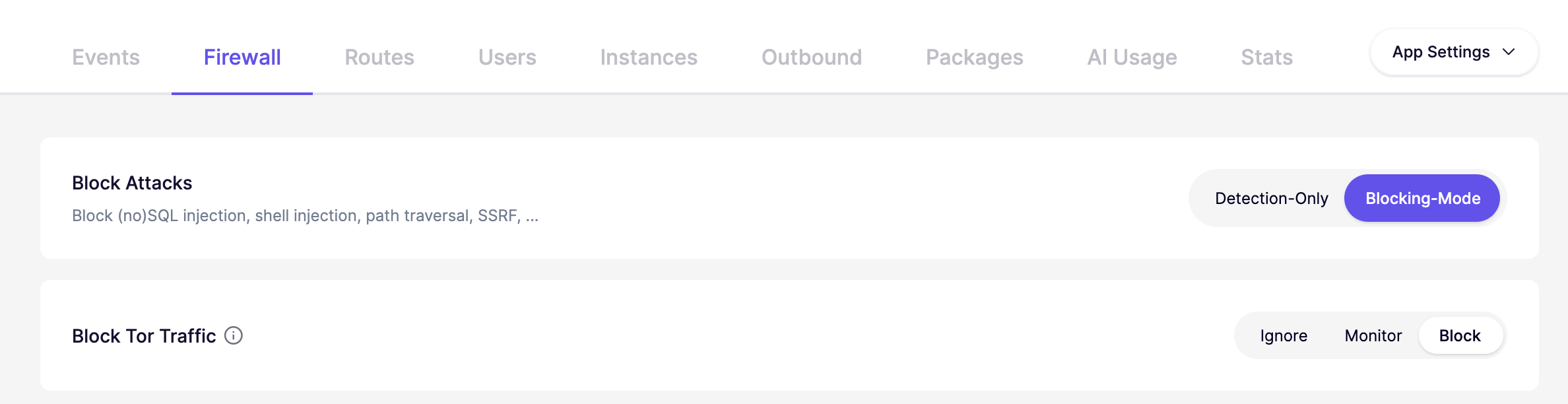
Select a specific app and continue to the **Firewall** tab. Click the toggle next to "**Block Tor Traffic"** to enable Tor blocking. You can Ignore, Monitor or Block Tor traffic.
{% hint style="info" %}
Note that Tor blocking is not immediate; it takes up to a minute for the block to take effect.
{% endhint %}