# Setting Up Rate Limiting for Routes
### Introduction
Zen Firewall by Aikido allows you to **set up rate limiting on routes** to protect your application from abuse, such as preventing excessive password reset requests. You can rate limit, webpages, REST API routes as well as GraphQL APIs.
{% hint style="warning" %}
Rate limiting is not available in lambda or serverless environments
{% endhint %}
### Supported Functionality
* Set rate limiting on specific routes
* Set rate limiting on multiple routes by adding a wildcard\* route
* Set rate limiting on IP address or [user ID](https://help.aikido.dev/doc/block-users-with-zen/docbO6Nm6Zb1#how-to-identify-and-block-users), or a [custom group ID](https://help.aikidogov.us/zen-firewall/zen-features/setting-up-rate-limiting-for-routes#how-it-works) (e.g. company ID for B2B SaaS)
* Disable protection for a specific route instead disabling protection for your entire app.
* [Localhost](http://localhost) or 127.0.0.1 is never rate limited
> Rate limiting is based on individual IP addresses or [user identification](https://help.aikido.dev/doc/block-users-with-zen/docbO6Nm6Zb1#how-to-identify-and-block-users).\
> For example, if the limit is 10 requests per minute:
>
> * ❌ **Blocked**: A single IP making 11 requests will be
> * ✅ **Allowed:** 11 different IPs making one request each
>
> This helps prevent abuse while allowing normal traffic from multiple users.
### How to set up rate limiting
Step 1: Navigate to a specific app and open the Routes tab
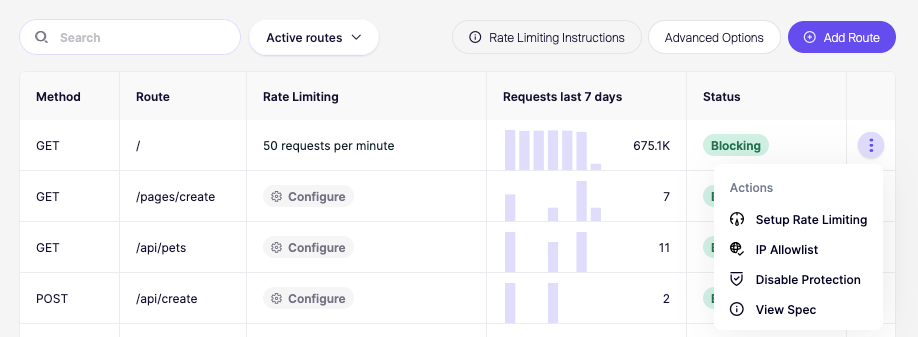
Step 2: Open Action Menu of the specific route you wish to apply rate limiting to. Clicking Setup rate limiting will open a modal.
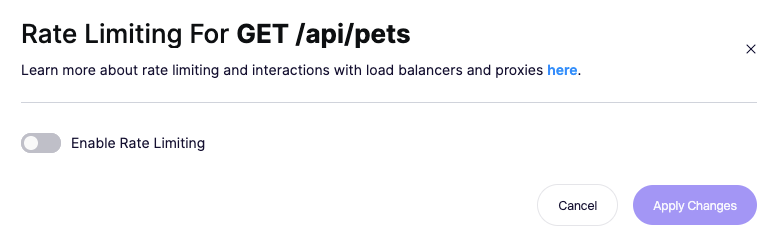
**Step 3**: **Enable Rate Limiting** and specify the number of requests allowed per timeframe. Save by updating the routes.
> Config changes take up to 1 minute to take effect.
### Setting up rate limiting for multiple routes at once
You can set up rate limiting for multiple routes at once by adding a wildcard route.
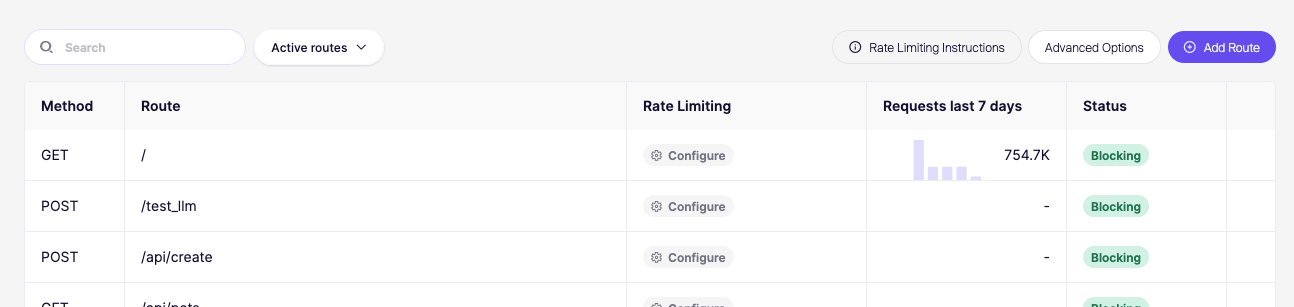
**Step 1.** On the routes page, click **Add Route.**
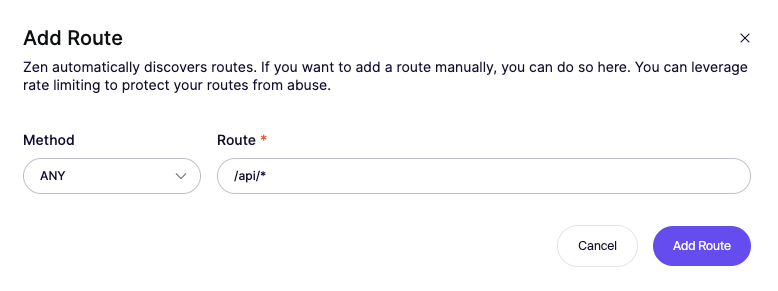
**Step 2.** Add a wildcard route by adding an `*` in the route.
**Step 3.** The wildcard will appear now in the list. Proceed to set up rate limiting the same way as above.

## How it works
### **Order of operations**
Aikido Zen enforces rate limits in the following order of priority:
1. Group level
2. User level
3. IP level
Once a request is rate limited at a higher level (e.g., group), the lower levels (user or IP) are not evaluated.
### **Sliding window**
Tracks events using a moving time frame that continuously slides forward. Unlike fixed windows that reset at specific times, sliding windows maintain a rolling count of the most recent period (e.g., last 60 seconds). This prevents edge cases where brief traffic spikes could bypass limits at window boundaries.
### **Route selection (wildcards)**
Zen will first select the exact route match (without wildcards) to apply a rate limit. If no exact route is found wildcard matches are applied based on the lowest limit. Only one limit is applied at any given time, a single requests will never hit multiple limits.
### **Group-based rate limiting**
To limit the number of requests for a group of users, you can use the `setRateLimitGroup` function. This is useful if you want to limit the number of requests per team or company. Please note that if a rate limit group is set, the configured rate limits are only applied to the group and not to individual users or IP addresses.
Available for:
* [Node.js](https://github.com/AikidoSec/firewall-node/blob/main/docs/user.md#rate-limiting-groups)
* [Python](https://github.com/AikidoSec/firewall-python/blob/main/docs/user.md#rate-limiting-groups)
* [Java](https://github.com/AikidoSec/firewall-java/blob/main/docs/user.md#rate-limiting-groups)
* [PHP](https://github.com/AikidoSec/firewall-php/blob/main/docs/user.md#rate-limiting-groups)
* [Go](https://pkg.go.dev/github.com/AikidoSec/firewall-go/zen#SetRateLimitGroup)
* [.NET](https://github.com/AikidoSec/firewall-dotnet/blob/main/docs/user.md#rate-limiting-groups)
* [Ruby](https://github.com/AikidoSec/firewall-ruby/blob/main/docs/rails.md#rate-limiting-groups)
## Exceptions
* [To remove rate limits for a specific user, you can disable rate limiting.](https://help.aikidogov.us/zen-firewall/zen-features/blocking-users-with-zen-firewall#remove-rate-limiting) This will cause all rate limits to be bypassed for that user.