
CI/CDでDASTスキャンを実行
Scan your staging environment with Aikido DAST on every deploy, and fail the build when the scan finds open issues.
Prerequisites
- A staging or test environment that your pipeline deploys to, reachable from the Aikido scanning IP addresses.
- API client credentials with the
domains:read,domains:write, andissues:readscopes. A workspace admin creates them on the REST API integration page. curlandjqon the CI runner.
How it works
The pipeline calls 3 endpoints of the Aikido public API:
| Step | Endpoint | Purpose |
|---|---|---|
| Start the scan | POST /domains/scan | Queues a full scan for the domain. |
| Wait for the scan | GET /domains | Polls last_scanned_at until it is later than the moment the scan started. |
| Check the results | GET /issues/export | Lists open issues for the domain with filter_domain_id. |
Set up DAST in your pipeline
Add the staging domain
Add the staging or CI/CD endpoint as a domain in Aikido. Pick the scan type that fits it: front-end, REST API, or GraphQL API. Configure authentication if the app needs a login.
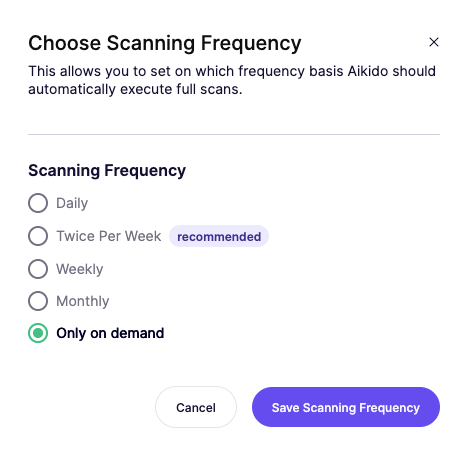
Set the scanning frequency to on demand
Open the domain's settings page, go to Scanning Frequency, select Only on demand, and click Save Scanning Frequency. Aikido then only scans the domain when your pipeline asks for it, so scheduled scans don't hit the environment while it is being redeployed.
Find the domain ID
The script needs the numeric ID of the domain. Open the domain in the Aikido app and copy the number from the URL. For
https://app.aikido.dev/domain/50866/settings, the domain ID is50866.Store the credentials in your CI/CD
Add these to your pipeline:
AIKIDO_CLIENT_IDandAIKIDO_CLIENT_SECRET: your API client credentials. Store them as secrets.AIKIDO_DOMAIN_ID: the domain ID from the previous step. This isn't sensitive, so a plain variable works.
The script reads all 3 from environment variables. GitLab CI and Bitbucket Pipelines expose variables to the script automatically. GitHub Actions and Azure Pipelines don't do that for secrets (GitHub Actions doesn't for plain variables either), so map them in the step's
env:block. See the GitHub Actions example.Add the scan script to your pipeline
Commit the script below to your repository and run it after the deploy to staging has finished.
Example script
The script starts a scan, waits until last_scanned_at is later than the start time, and fails with exit code 1 when the domain has open critical or high issues. Change SEVERITIES to gate on other levels.
If your workspace is not in the EU region, change AIKIDO_URL to https://app.us.aikido.dev, https://app.au.aikido.dev, or https://app.me.aikido.dev.
#!/usr/bin/env bash
set -euo pipefail

AIKIDO_URL="${AIKIDO_URL:-https://app.aikido.dev}"
API="$AIKIDO_URL/api/public/v1"
DOMAIN_ID="${AIKIDO_DOMAIN_ID:?Set AIKIDO_DOMAIN_ID}"
SEVERITIES="${SEVERITIES:-critical,high}"
TIMEOUT_SECONDS="${TIMEOUT_SECONDS:-3600}"
POLL_SECONDS=30

# 1. Get an access token with the client credentials flow.
# Tokens expire after 1 hour, so the script refreshes it before each call.
refresh_token() {
  TOKEN=$(curl -sf -X POST "$AIKIDO_URL/api/oauth/token" \
    -u "$AIKIDO_CLIENT_ID:$AIKIDO_CLIENT_SECRET" \
    -H "Content-Type: application/json" \
    -d '{"grant_type": "client_credentials"}' | jq -r '.access_token')
  auth=(-H "Authorization: Bearer $TOKEN")
}

# Prints last_scanned_at (unix timestamp) of the domain, or 0 if it was never scanned
last_scanned_at() {
  local page=0 result found
  refresh_token
  while :; do
    result=$(curl -sf "${auth[@]}" "$API/domains?page=$page&per_page=100")
    [ "$(jq 'length' <<<"$result")" -eq 0 ] && { echo "Domain $DOMAIN_ID not found" >&2; exit 1; }
    found=$(jq -r --argjson id "$DOMAIN_ID" \
      '.[] | select(.id == $id) | (.last_scanned_at // 0 | tonumber)' <<<"$result")
    [ -n "$found" ] && { echo "$found"; return; }
    page=$((page + 1))
  done
}

# 2. Start the scan
refresh_token
STARTED_AT=$(date +%s)
curl -sf -X POST "${auth[@]}" "$API/domains/scan" \
  -H "Content-Type: application/json" \
  -d "{\"domain_id\": $DOMAIN_ID}" > /dev/null
echo "Started scan for domain $DOMAIN_ID"

# 3. Wait until the scan has finished
while :; do
  # Assign first so a failing lookup (e.g. unknown domain ID) aborts the script
  LAST=$(last_scanned_at)
  [ "$LAST" -ge "$STARTED_AT" ] && break
  if [ $(( $(date +%s) - STARTED_AT )) -ge "$TIMEOUT_SECONDS" ]; then
    echo "Scan did not finish within $TIMEOUT_SECONDS seconds" >&2
    exit 1
  fi
  echo "Scan running, checking again in $POLL_SECONDS seconds"
  sleep "$POLL_SECONDS"
done
echo "Scan finished"

# 4. Export open issues for this domain
refresh_token
ISSUES=$(curl -sf "${auth[@]}" -G "$API/issues/export" \
  --data-urlencode "format=json" \
  --data-urlencode "per_page=5000" \
  --data-urlencode "filter_status=open" \
  --data-urlencode "filter_domain_id=$DOMAIN_ID" \
  --data-urlencode "filter_severities=$SEVERITIES")

COUNT=$(jq 'length' <<<"$ISSUES")
if [ "$COUNT" -gt 0 ]; then
  echo "Found $COUNT open issue(s) with severity $SEVERITIES:"
  jq -r '.[] | "- [\(.severity)] \(.rule) (\(.domain_name))"' <<<"$ISSUES"
  exit 1
fi

echo "No open issues with severity $SEVERITIES"
A full scan can take from a few minutes to over an hour, depending on the size of the app and the scan type. Raise TIMEOUT_SECONDS if your scans take longer.
GitHub Actions example
This workflow runs the scan after your staging deploy job. It assumes the script is committed at scripts/aikido-dast-scan.sh. The ubuntu-latest runner already has curl and jq.
Add AIKIDO_CLIENT_ID and AIKIDO_CLIENT_SECRET under Settings → Secrets and variables → Actions → Secrets, and AIKIDO_DOMAIN_ID under the Variables tab.
name: Deploy staging and run DAST

on:
  push:
    branches: [main]

jobs:
  deploy-staging:
    runs-on: ubuntu-latest
    steps:
      - uses: actions/checkout@v4
      - name: Deploy to staging
        run: echo "Replace with your deploy steps"

  dast-scan:
    needs: deploy-staging
    runs-on: ubuntu-latest
    timeout-minutes: 75
    steps:
      - uses: actions/checkout@v4
      - name: Run Aikido DAST scan
        run: bash scripts/aikido-dast-scan.sh
        env:
          AIKIDO_CLIENT_ID: ${{ secrets.AIKIDO_CLIENT_ID }}
          AIKIDO_CLIENT_SECRET: ${{ secrets.AIKIDO_CLIENT_SECRET }}
          AIKIDO_DOMAIN_ID: ${{ vars.AIKIDO_DOMAIN_ID }}
          # Uncomment if your workspace is not in the EU region
          # AIKIDO_URL: https://app.us.aikido.dev
timeout-minutes is set above the script's 60-minute TIMEOUT_SECONDS, so the script reports the timeout before GitHub cancels the job. Raise both if your scans take longer.
Troubleshooting
- The script times out. Check the domain in the Aikido app. If the scan failed because Aikido could not reach the environment, allowlist the scanning IP addresses.
curlreturns 401 or 403. The access token is missing a scope. Check that the API client hasdomains:read,domains:write, andissues:read.curlreturns 404 on/domains/scan. TheAIKIDO_DOMAIN_IDdoes not match a domain in this workspace, orAIKIDO_URLpoints at the wrong region.