
Secrets AutoTriage
Secrets AutoTriage is how Aikido Agent reduces noise from secrets scanning so you can focus on exposed secrets that are actually dangerous. It first tries to rule out false positives, then (when a finding is real) ranks it by how risky the exposed secret is.
Secrets AutoTriage works on the secrets Aikido detects in your code. It doesn't change what gets scanned, only how findings are filtered and prioritized. This functionality is only available for Pro and Advanced Plans.
Enabling Secrets AutoTriage
Secrets AutoTriage is not enabled by default. Only workspace admins can turns it on from the workspace settings.
Open the Triage settings
Go to Settings → Triage.
Enable Secrets AutoTriage
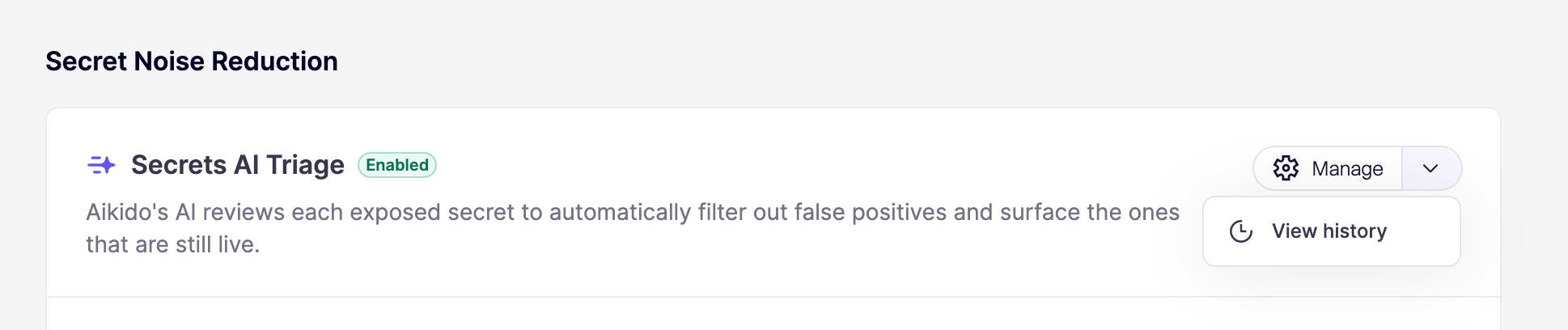
Under Secret Noise Reduction, toggle on Secrets AI Triage. Once enabled, Aikido applies AutoTriage to secret findings on your next scan.
What Secrets AutoTriage is (and isn't)
Secrets AutoTriage isn't itself a scanner. It sits downstream of your secrets scans and makes determinations about whether a match is a real, exposed secret and, if so, how risky that exposure is.
For the majority of findings, Aikido triages based on Aikido-defined rules and validity checks. For more ambiguous cases, Aikido uses the surrounding code context to decide whether a match is a genuine secret or a placeholder, example, or test value.
How Secrets AutoTriage works
False positive filtering before triage
Before a secret reaches your feed, Aikido filters out matches that look like secrets but aren't. That may include:
- Skipping test files, mock data, and example configurations
- Recognizing placeholder and example values that share the format of a real secret
- Applying your workspace Secret Keyword Filter to drop lines with known-safe keywords
- Honoring code comment exclusions and
.aikidofile exclusions
These steps alone suppress a significant portion of secret alerts.
Some legitimate-looking secrets can't be distinguished from real ones by pattern alone. When in doubt, Aikido keeps the finding so you can review it rather than hiding a real exposure.
Validity and permission checks
When a match looks like a real secret, Aikido's Live Secret Detection verifies whether the secret is still active and inspects the scope of access it grants. AutoTriage uses these signals to adjust priority:
- Expired or rotated secrets are downgraded, since they no longer pose a risk
- Read-only scopes are prioritized lower than write or delete access
- Active secrets with write/delete scopes are upgraded for immediate action
Signals Secrets AutoTriage considers
Secrets AutoTriage is context-hungry by design. In practice, it considers things like:
- Whether the match is active, expired, or already rotated
- The scope of permissions an active secret grants
- Whether the file is a test, mock, example, or documentation file versus production code
- Whether the value is a placeholder or example rather than a real credential
- The sensitivity of the systems the secret unlocks
Review analysis history
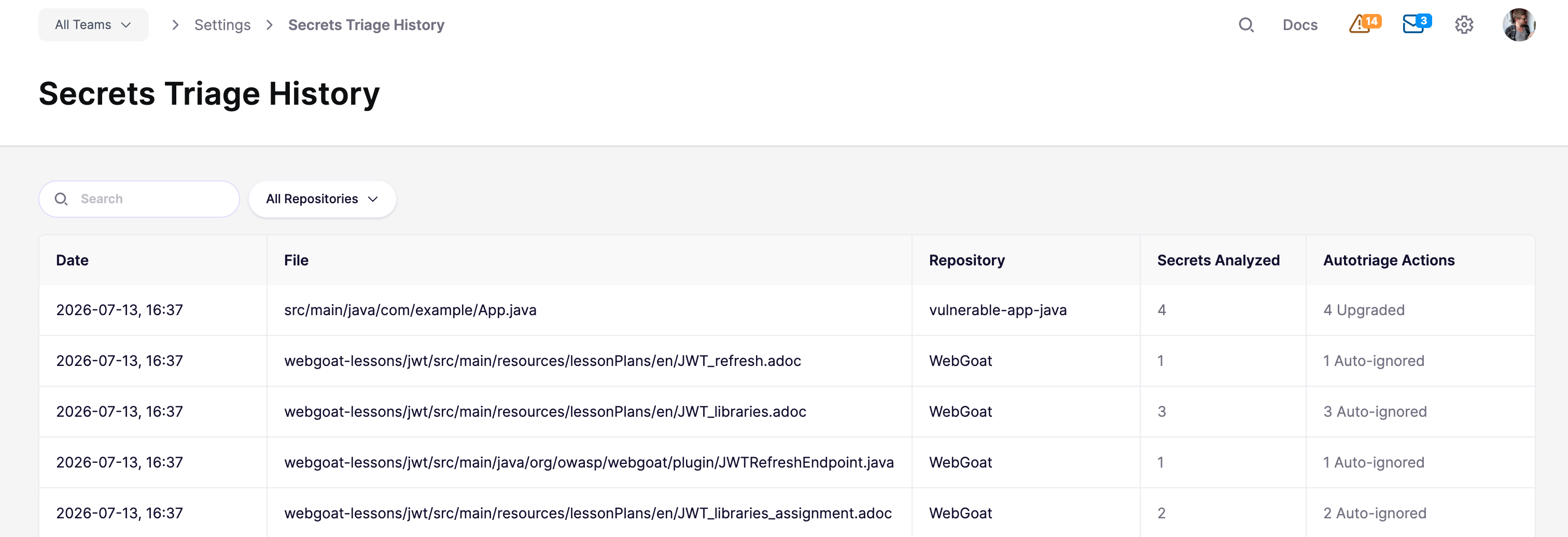
Every AutoTriage verdict change is recorded so you can see what Aikido analyzed and what it did. In Triage settings, open the Manage dropdown, click View History to go to the Secrets Triage History page.
The history table groups related assessments by file, repository, and time. Each row shows the date, file path, repository, number of secrets analyzed, and a summary of the triage actions taken. Use the search and repository filters to narrow the list.
Actions you'll see:
-
Upgraded: Priority raised because the secret looks more exploitable or higher risk
-
Downgraded: Priority lowered because the secret looks less risky (for example, a placeholder, test value, or low-impact scope)
-
Auto-ignored: Finding removed from your feed as a false positive
-
Neutral: Assessment ran without changing priority
Resolving triaged secrets
Once a secret is confirmed as a real exposure, rotate it as soon as possible. Removing the secret from your code isn't enough on its own, since it remains in your git history. For guidance on cleaning up and rotating exposed secrets, see Resolving Malware and Leaked Secret Issues.
If AutoTriage flags something you believe is a false positive, you can ignore the issue in the UI, ignore it via a code comment, or add a workspace-wide Secret Keyword Filter.