
Add or Ignore Subdomains in Attack Surface
By default, Aikido automatically discovers subdomains related to your domain. In some cases, you may want to manually add a subdomain (for assets that aren’t detected automatically) or exclude a subdomain (for assets that fall outside of your scope or don’t need scanning).
Why manage subdomains?
- Add subdomains: Ensure important assets (like api.example.com) are included in your security scans.
- Exclude subdomains: Reduce noise and avoid scanning third-party or out-of-scope services (like a test environment or marketing site hosted elsewhere).
Adding a subdomain
-
Navigate to your domain overview page.
-
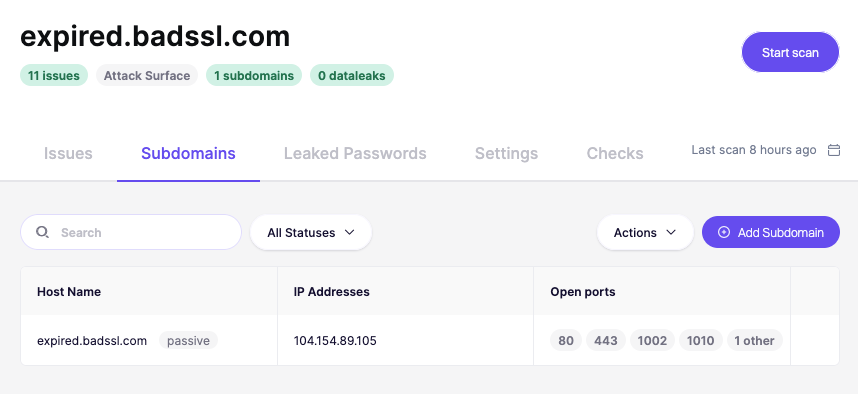
Go to the Subdomains tab.
-
Click Add Subdomain in the top right.
-
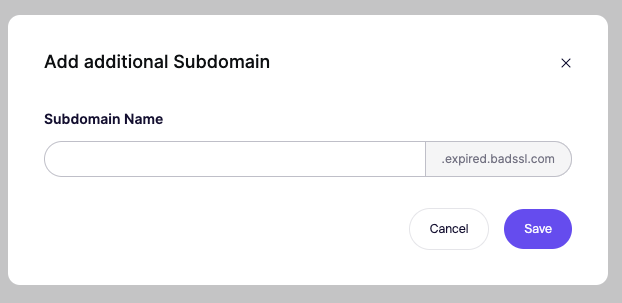
Enter the subdomain you want to monitor.
-
Confirm to include it in future scans.
Excluding a subdomain
-
From the Subdomains tab, find the subdomain in the list.
-
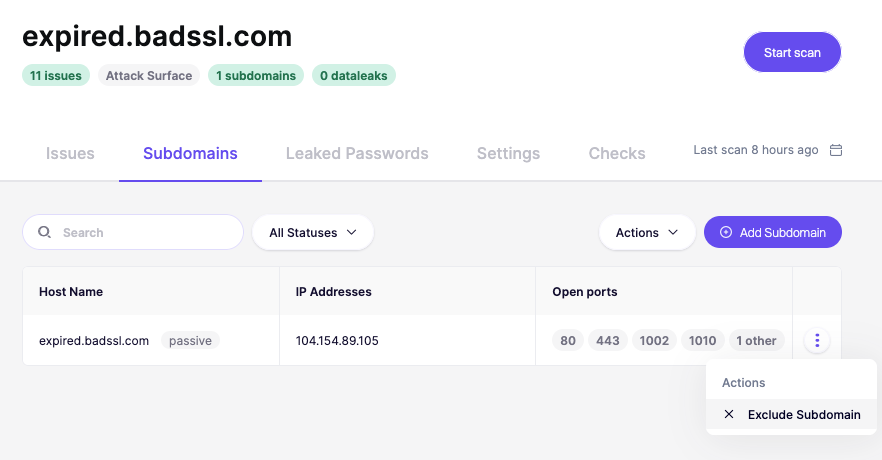
Open the Actions menu (three dots on the right).
-
Select Exclude Subdomain.
-
The subdomain will no longer be scanned.